
May 3rd, 2018
dslrBooth for Windows: 5.23 Update
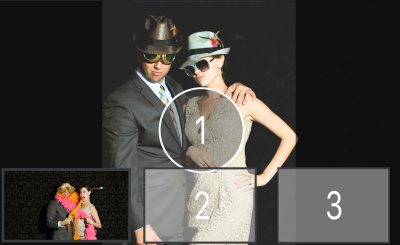
Cropped Live View to Match Template Photos
Live view will now show in the shape of the photo placeholder from the template, allowing guests to position themselves within the placeholder limits. Turn on/off under Settings, Display, Capture Screen, Crop Liveview.
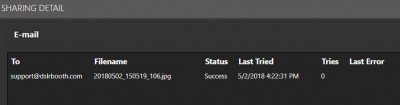
Detailed Sharing Information
When viewing stats in Settings > General, you can now get detailed information per share.
New Supported Cameras
- Canon EOS M50 / EOS Kiss M
- Canon EOS T7 / 2000D
- Canon EOS T100 / 4000D
- Canon EOS SL2 / 200D
Bug Fixes
- Fix for browse button not appearing when using Survey and Video function
- Fix for large GIF file being stretched
- Templates are center aligned on start screen
v5.23.0504
- Added new setting to turn live view cropping on and off (Settings, Display, Capture Screen).
- Fix for upload issue when doing print + gif sessions.
- Speed up live view startup during countdown for photos 2, 3, 4.
- Improve resolution of photo on print file when photo placeholder is not same exact aspect ratio as photo image file.
- Improved Twilio SMS configuration.
v5.23.0511
- Fix for last image staying on screen during next countdown if live view is off.
v5.23.0606.1
- Speed up final print processing time.
- Fix of issues with GIF and Boomerang overlays tearing on specific graphics cards.
v5.23.0619.1
- Fix keyboard issues on Windows 10 version 1803.
Related Articles
Your Booth, Your Look: Style Every Share Button in LumaBooth for Windows 8.5
November 24, 2026
In LumaBooth for Windows 8.5 every share button gets its own color, caption and position, and a Shar...
Read More
The Caricature Artist Who Never Takes a Break: 46 New AI Portrait Styles
November 17, 2026
AI Portraits now include 46 caricature styles in four categories: Black & White, Color, Sticker...
Read More
Scribble Booth: Mirrored Photos and Videos in LumaBooth for Windows 8.3.0
August 11, 2026
LumaBooth for Windows 8.3.0 adds mirrored photo and video capture for mirror and scribble booths, de...
Read More